
API introduction
The Whatixo REST API lets your website, app or software send WhatsApp messages and manage your contacts and groups from your connected numbers. All responses are JSON.
At a glance
| Base URL | https://api.whatixo.com/api |
| Authentication | x-api-key: wtx_… header (or Authorization: Bearer wtx_…) |
| Format | JSON body (Content-Type: application/json), UTF-8, 1 MB max |
| Method | POST for all public operations |
| Rate limit | 200 requests / minute for sending messages — see Errors and limits |
| HTTPS | Always use https:// to protect your key. |
1. Get your API key
Open the settings
In Whatixo: Settings → Integrations & API tab.
Copy the key
Click Copy key. It starts with wtx_ followed by 64 hexadecimal characters.
Copy the number ID
Each connected number has a deviceId: it tells the API which number to send from.
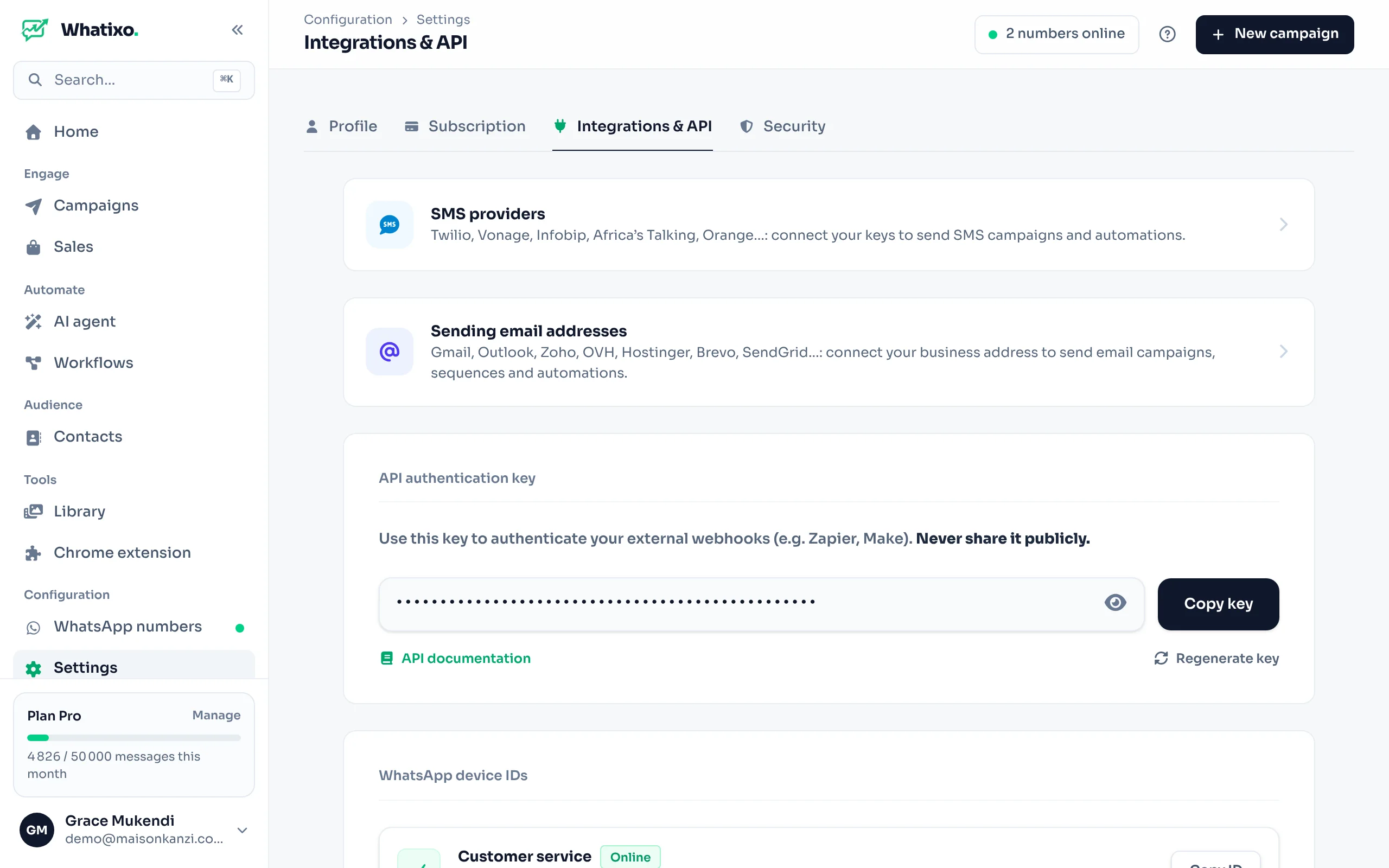
The key gives access to your numbers and contacts. Never embed it in browser JavaScript, a mobile app or a public Git repository. Store it in an environment variable (WHATIXO_API_KEY). If it leaked, click Regenerate key: the old one stops working immediately.
2. Authenticate your requests
Send the key in the x-api-key header of every request:
-H "x-api-key: wtx_7c1e9a4b2d8f…"The standard Authorization header is also accepted:
-H "Authorization: Bearer wtx_7c1e9a4b2d8f…"Without a key or with an invalid key, the API returns 401. If the subscription is suspended, it returns 402 with the code API_ACCOUNT_SUSPENDED.
3. Your first call
Let’s send “Hello” to your own number:
curl -X POST https://api.whatixo.com/api/whatsapp/messages/send \
  -H "x-api-key: $WHATIXO_API_KEY" \
  -H "Content-Type: application/json" \
  -d '{
    "deviceId": "8f2c1a7e-4b9d-4e21-9a6f-3c5d7e1b2a90",
    "to": "243812345678",
    "text": "Hello from the Whatixo API 👋"
  }'
// Node.js 18+ (native fetch)
const res = await fetch('https://api.whatixo.com/api/whatsapp/messages/send', {
method: 'POST',
headers: {
'x-api-key': process.env.WHATIXO_API_KEY,
'Content-Type': 'application/json',
},
body: JSON.stringify({
deviceId: '8f2c1a7e-4b9d-4e21-9a6f-3c5d7e1b2a90',
to: '243812345678',
text: 'Hello from the Whatixo API 👋',
}),
});
const data = await res.json();
if (!res.ok) throw new Error(data.error);
console.log(data); // { success: true, message: 'Transmis avec succès' }$payload = [
'deviceId' => '8f2c1a7e-4b9d-4e21-9a6f-3c5d7e1b2a90',
'to' => '243812345678',
'text' => 'Hello from the Whatixo API 👋',
];
$ch = curl_init('https://api.whatixo.com/api/whatsapp/messages/send');
curl_setopt_array($ch, [
CURLOPT_POST => true,
CURLOPT_RETURNTRANSFER => true,
CURLOPT_HTTPHEADER => [
'x-api-key: ' . getenv('WHATIXO_API_KEY'),
'Content-Type: application/json',
],
CURLOPT_POSTFIELDS => json_encode($payload),
]);
$data = json_decode(curl_exec($ch), true);
$status = curl_getinfo($ch, CURLINFO_HTTP_CODE);
curl_close($ch);import os, requests
res = requests.post(
"https://api.whatixo.com/api/whatsapp/messages/send",
headers={"x-api-key": os.environ["WHATIXO_API_KEY"]},
json={
"deviceId": "8f2c1a7e-4b9d-4e21-9a6f-3c5d7e1b2a90",
"to": "243812345678",
"text": "Hello from the Whatixo API 👋",
},
timeout=30,
)
res.raise_for_status()
print(res.json())Response:
{ "success": true, "message": "Transmis avec succès" }Conventions
Phone numbers
In international format without the + or leading zero: 243812345678 (DR Congo), 2250701020304 (Côte d’Ivoire), 14155550123 (USA). Spaces, dashes, parentheses and “+” are stripped automatically: "+243 81 234 5678" is accepted.
For a group, pass its WhatsApp ID (JID) ending in @g.us, obtained from the group list.
Response format
A successful response contains "success": true and the requested data. An error returns a 4xx/5xx HTTP code and a readable message:
{ "success": false, "error": "L'appareil n'est pas connecté." }Quotas
Every message sent through the API counts toward your plan’s monthly quota, like messages sent from the app.
Endpoint list
| Resource | Endpoint | Purpose |
|---|---|---|
| Messages | POST /whatsapp/messages/send | Text, image, video, audio, voice note, document |
| Contacts | POST /whatsapp/contacts | List CRM contacts |
POST /whatsapp/contacts/info | Read a contact | |
POST /whatsapp/contacts/upsert | Create or update a contact | |
POST /whatsapp/contacts/check | Check whether numbers have WhatsApp | |
POST /whatsapp/contacts/avatar | A number’s profile picture | |
| Groups | POST /whatsapp/groups/create | Create a group |
POST /whatsapp/groups/list | List groups | |
POST /whatsapp/groups/members | List members | |
POST /whatsapp/groups/members/{add|remove|promote|demote} | Manage members and admins | |
POST /whatsapp/groups/settings/{name|description} | Rename, change the description | |
| Status & session | POST /whatsapp/status/publish | Publish a status |
POST /whatsapp/accounts/logout | Disconnect a number | |
| Incoming webhooks | POST /webhook/{wh_id} | Trigger a workflow |